AI is being sold as the future of homecare scheduling. But can it actually fill a shift at 6 a.m. when two PSWs call in sick? Here is what Ontario agency owners need to know.
You run a PSW agency in Ontario. You have an open shift starting in three hours. Two PSWs have called in sick. You have 600+ caregivers on your roster, but you need to find the right one—someone with the right credentials, the right location, the right availability, and the right skills for this specific client. You have heard that AI can solve this. You are skeptical.
I have been running the systems inside a live Ontario PSW agency for three years. I have watched the AI hype cycle in homecare software. I have tested the tools. And I have learned something important: AI does not fill shifts. A connected operating system fills shifts. The distinction matters more than most vendors will admit.
This guide is the operator's perspective on AI in homecare scheduling. Not the enterprise version. Not the vendor pitch. What actually works when you are staring at an unfilled shift at 6 a.m.
The Problem: The Scheduling Crisis Is Not a Technology Problem
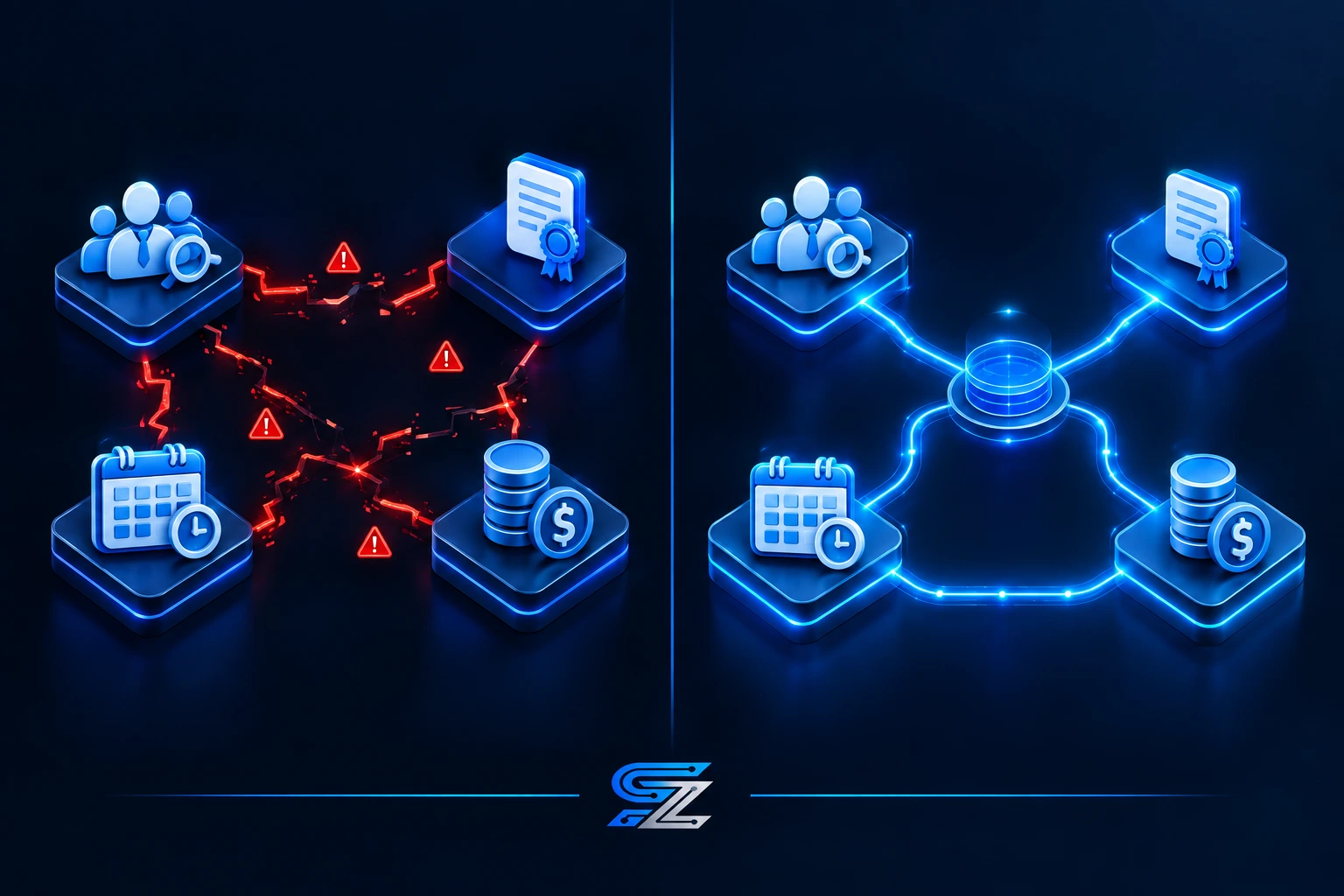
The "before state" for most PSW agencies is not a lack of software. It is a lack of connection between the software they already have. Your recruitment database is in one system. Your credential tracking is in another. Your scheduling is in a third. Your payroll is in a fourth. None of them talk to each other.
The result is that you cannot answer basic questions quickly. Which caregivers are available at 7 a.m. tomorrow? Which ones have current CPR certification? Which ones are within 20 kilometres of the client? Which ones have already worked 40 hours this week? Finding the answers requires opening four different systems and cross-referencing manually.
The numbers tell the story. At Essential Staff, our payroll used to take 3+ hours manually. Our credential tracking was a colour-coded spreadsheet that someone had to update by hand. Our open shift alerts required calling PSWs one by one. We had 187 applicants in our database, and we were still scrambling to fill shifts.
This is the reality that AI vendors do not talk about. Their enterprise tools are designed for large hospital systems with dedicated IT departments. They are not designed for the agency owner who is also the scheduler, the compliance officer, and the payroll administrator.
💡 Insider Tip: Before you invest in AI, audit your current systems. If your recruitment, credential, and scheduling data live in separate places, AI will not fix that. Connection will.
Why This Matters Right Now in 2026
Three trends are making this conversation urgent. First, AlayaCare and other enterprise vendors are publishing heavily on AI in homecare scheduling. Their content is polished, their demos are impressive, and their pricing is prohibitive for most Ontario agencies.
Second, the Canadian operator perspective is missing from the conversation. The AI content that exists is written for US markets or hospital systems. It does not address the realities of Ontario's THA licensing, HSCPOA registration, or CRA placement-agency rules.
Third, the PSW shortage is not going away. The Home Care Worker PR pilot intake is paused. The PSW wage enhancement is permanent, but it has not solved the shortage. Agencies need to do more with the staff they have.
The Solution: Connection Before Automation
The answer is not to buy an AI scheduling tool. It is to build a connected operating system where every piece of data flows into one place—and then layer intelligence on top.
Here is a before-and-after comparison of what that looks like inside a PSW agency.
Before | After |
Recruitment data, credential tracking, and scheduling live in separate systems. | One connected system where every caregiver's credentials, availability, and location are visible in one place. |
You manually cross-reference spreadsheets to find a qualified caregiver. | The system surfaces qualified caregivers instantly, ranked by fit. |
Open shift alerts require calling PSWs one by one. | Open shift alerts reach 600+ PSWs via email blast in under 3 minutes. |
Credential expiry is tracked in a spreadsheet. | Automated alerts fire at 30, 14, and 7 days before expiry. |
Payroll takes 3+ hours manually. | Payroll takes 18 minutes with approved timesheets flowing directly into the system. |
Need help connecting your systems? See how SYNERZ builds this for Canadian PSW agencies → www.synerz.ca
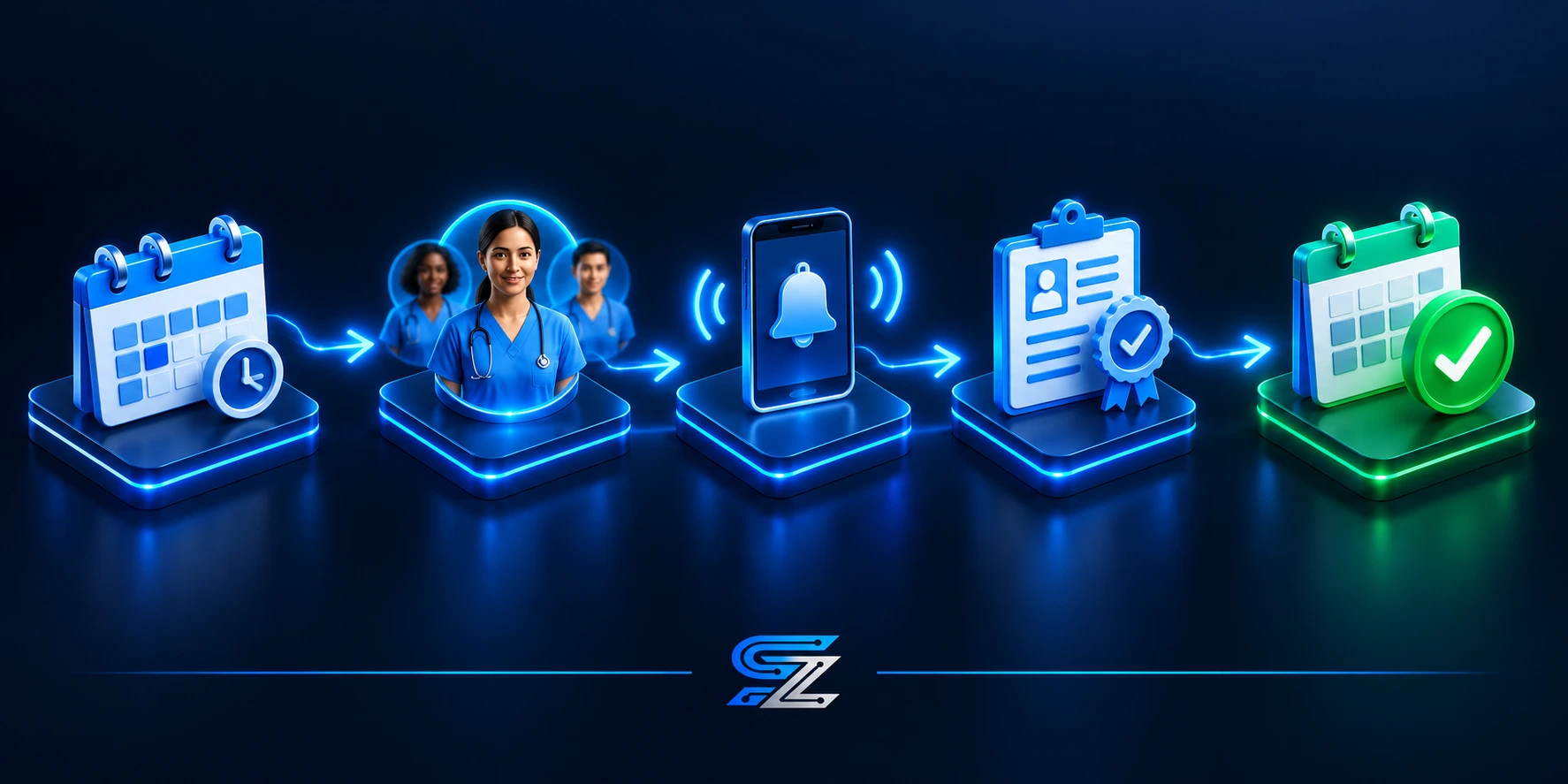
Pipeline Process Breakdown: How the System Fills a Shift
Step 1: Shift Opens
A PSW calls in sick. The shift appears in the system as unfilled.
Step 2: System Identifies Qualified Caregivers
The system scans the roster for caregivers who meet the requirements: right credentials, right location, right availability, right skills. It does not just find anyone. It finds the right person.
Step 3: Automated Alerts Go Out
The system sends an alert to all qualified caregivers via email blast. At Essential Staff, this reaches 600+ PSWs in under 3 minutes. The first qualified caregiver to respond gets the shift.
Step 4: Credential Verification Is Automatic
Before the caregiver is confirmed, the system verifies their credentials. PSW Certificate. Vulnerable Sector Check. CPR. TB Test. HSCPOA registration. If any credential is expired, the system flags it and blocks the assignment.
Step 5: Shift Is Filled
The caregiver is confirmed. The client is notified. The shift is covered.
Step 6: Timesheet Flows to Payroll
After the shift, the caregiver submits their timesheet. The approved timesheet flows directly into payroll. No manual entry. No errors.
Step 7: Client Is Invoiced
Approved timesheets generate the client invoice. One click. Done.
This is what the Two-Pipeline System looks like in practice. The Staff Pipeline and the Client Pipeline converge at the connected operating core.
Real Results From a Live Ontario Agency
We have been running this system at Essential Staff for three years. The results speak for themselves.
Our recruitment database has grown from 187 applicants to over 600. Our biweekly payroll used to take 3+ hours manually—it now takes 18 minutes. We have run 26 payroll cycles per year for 3 years with zero CRA penalties. Our open shift alerts reach 600+ PSWs in under 3 minutes. Our credential alerts are automated at 30, 14, and 7 days before expiry.
We use Odoo 19 Enterprise to run this system. It connects our recruitment, credential tracking, scheduling, payroll, billing, and compliance into one operating core. When a caregiver's credential is expired, the system blocks them from being scheduled. When a shift opens, the system identifies qualified caregivers and alerts them automatically. When a timesheet is approved, it flows directly into payroll and billing.
This is not AI in the enterprise sense. It is a connected operating system that does the work that AI vendors promise—but actually delivers.
Step-by-Step — How to Get Started
Audit Your Current Systems: List every system you use for recruitment, credential tracking, scheduling, payroll, and billing. How many are there? Do they talk to each other?
Identify the Gaps: Where do you manually cross-reference data? Where do errors happen? Where do you lose time?
Start with Connection: Before you invest in AI, invest in connection. A connected system that surfaces the right data is more valuable than an AI tool that sits on top of disconnected data.
Automate the Basics: Credential alerts. Open shift notifications. Timesheet-to-payroll flow. These are the automations that save time and reduce risk.
Layer Intelligence on Top: Once your data is connected and your basics are automated, you can layer intelligence on top—ranking caregivers by fit, predicting no-shows, optimizing schedules.
Common Mistakes to Avoid
1. Buying AI Before Connecting Your Data
AI is only as good as the data it has access to. If your data is in four different systems, AI will not fix that. Connection comes first.
2. Assuming Enterprise Tools Work for Small Agencies
AlayaCare and similar platforms are designed for large hospital systems with dedicated IT departments. They are not designed for the agency owner who is also the scheduler.
3. Overlooking the Human Element
AI cannot replace the judgment of an experienced scheduler. It can support it. But the final decision should always be human.
4. Ignoring Compliance
In Ontario, compliance is not optional. Any system you use must track HSCPOA registration, THA licensing, and CRA rules. AI does not change that.
5. Expecting AI to Fill Shifts
AI does not fill shifts. A connected system fills shifts. The distinction matters.
Closing CTA
Book a free 20-minute Systems Review. We review your current systems and give you a clear picture of where your agency stands. No pitch. No obligation. Just clarity.
📧 info@synerz.ca | 📞 +1 647 493 8110 | 🌐 www.synerz.ca
Frequently Asked Questions
Can AI actually fill a PSW shift?
AI alone cannot fill a shift. A connected operating system can. The system identifies qualified caregivers, sends automated alerts, verifies credentials, and confirms the assignment. The intelligence is in the connection, not the AI.
What is the best scheduling software for a Canadian PSW agency?
The best software is one that connects recruitment, credential tracking, scheduling, payroll, and billing into one system. Enterprise tools designed for hospitals are often overkill. A connected ERP, like the one we implement at SYNERZ using Odoo 19 Enterprise, is designed for the realities of a Canadian PSW agency.
How much does AI scheduling software cost?
Enterprise AI tools can cost tens of thousands per year. A connected ERP for a small agency is more affordable. SYNERZ pricing starts at $650/month, with free setup.
Is AI scheduling better than manual scheduling?
AI does not replace manual scheduling. It supports it. A connected system surfaces the right caregivers, verifies credentials, and automates alerts. The final decision remains with the human scheduler.
How does AI handle credential verification?
AI can flag expired credentials, but it cannot verify them. A connected system tracks credential expiry and blocks scheduling if a credential is expired. This is an automation, not an AI function.
What is the Two-Pipeline System?
The Two-Pipeline System is how we describe the flow of staff and clients through the agency. The Staff Pipeline flows from recruitment to payroll. The Client Pipeline flows from lead to invoice. Both converge at the connected operating core.
Author: Munawar Abbas — Founder & CEO, SYNERZ