
How SYNERZ eliminates paper forms, manual scanning, and lost attendant care plans with a connected digital system that turns an iPad signature into a PDF in one step.
Every PSW agency in Ontario knows the paperwork grind.
You send a worker to a client's home with a paper attendant care plan. They get a signature. They bring the paper back to the office—hopefully. Someone scans it. Someone else files it. Someone else enters the billing data.
That workflow is broken. It is slow, error-prone, and expensive.
Here is the reality: The average home care agency loses 5–8% of its billable time to paperwork delays and missing documents. For a mid-sized agency, that is thousands of dollars a month in revenue you are leaving on the table.
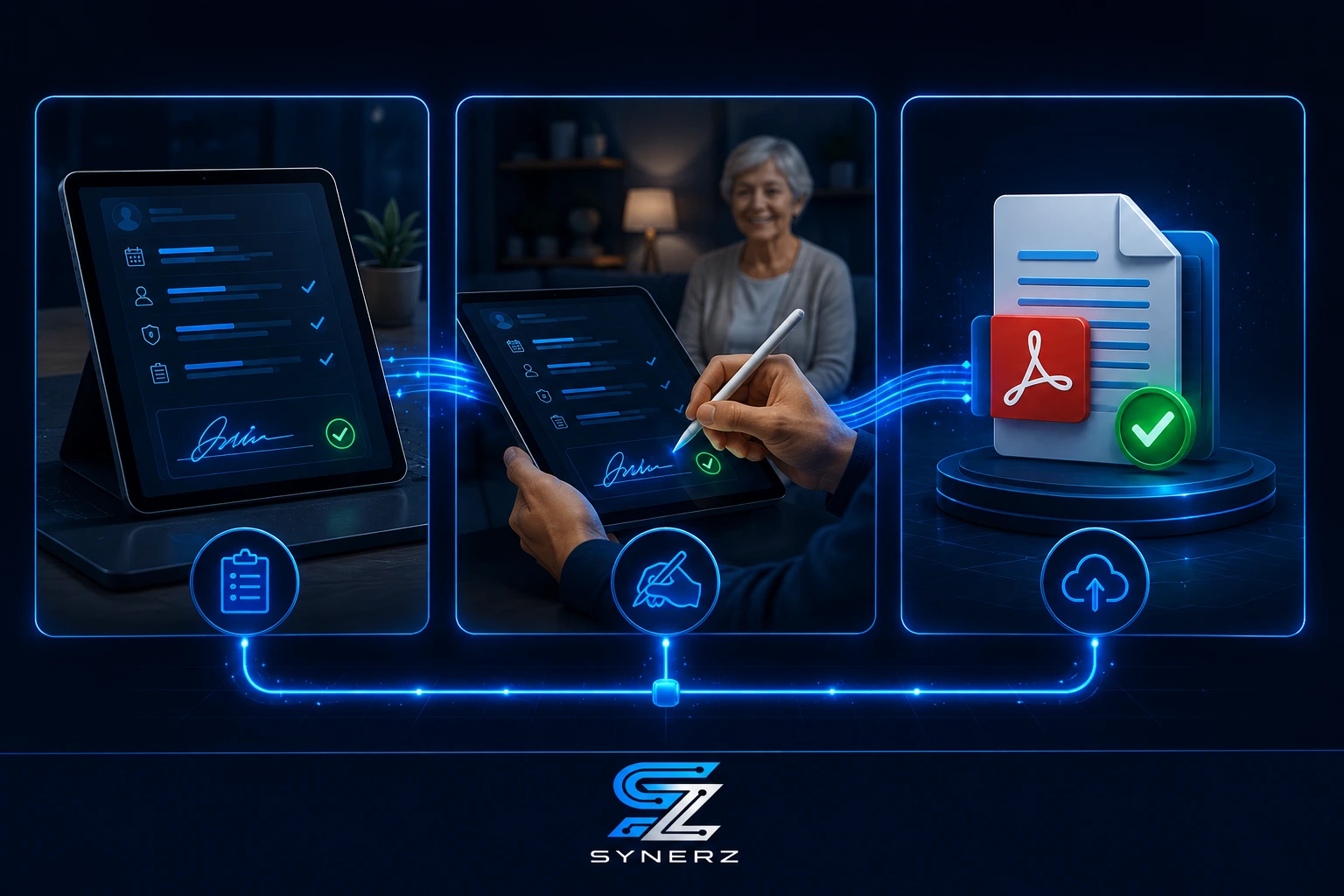
The fix is simpler than you think. A connected system that captures an iPad signature and generates a PDF attendant care plan in one step. No scanning. No manual entry. No paper.
This blog walks you through how this works inside a live Ontario PSW agency—and why it is the single biggest operational win you can make in 2026.
The Problem: The Paper-Based Attendant Care Plan Nightmare
Before we implemented a connected system at Essential Staff, our attendant care plan process was a mess. And I am not being dramatic—it was genuinely costing us money.
A PSW would visit a client, provide care, and have the client sign the attendant care plan on a paper form. They would bring that form back to the office, where someone would manually scan it into a shared drive. Then a billing clerk would need to open the scanned file, read the care notes, and manually input the hours and services into our billing software. The paper then went into a filing cabinet.
That process sounds like it works, but in practice, it breaks constantly. Papers get lost in the car. Signatures are illegible. The scan is too dark to read. The billing clerk misreads the hours because the handwriting is messy. And the whole thing takes hours.
At Essential Staff, we were spending over three hours every biweekly payroll cycle just on manual data entry related to attendant care plans. That was before we tracked the time spent on the scanning, the filing, and the follow-up calls to PSWs who forgot to bring back their forms.
For a 600+ applicant agency, that is a huge efficiency drain.
The core issue is a disconnected workflow. The care plan exists on paper, separate from the client record, separate from the billing system, separate from the payroll system. And that separation creates errors, delays, and lost revenue.
For PSW agency owners, the pain is even sharper. You are running on razor-thin margins in 2026. The Ontario minimum wage hit $17.95 an hour on October 1, 2026. The PSW Wage Enhancement is permanent for 2026-27. You need to bill accurately and quickly. A paper-driven attendant care plan process is a direct drag on your cash flow.
Why This Matters Right Now in 2026
The regulatory and market environment in Ontario is tightening, making an efficient, digital attendant care plan process non-negotiable.
First, the CRA is actively enforcing worker classification rules in the healthcare staffing sector this year. You need clean, auditable records proving care was delivered and who delivered it. A PDF with a clear signature is much stronger evidence than a smudged paper copy.
Second, HSCPOA registration is becoming the de facto standard for PSWs in Ontario. Employers are now facing de facto mandatory registration of their PSWs. To manage this, you need a system that can track which workers have what credentials—and your attendant care plans are a critical part of that compliance record.
Third, the Home Care Worker PR Pilot has paused intake for 2026. The pressure on the existing PSW workforce is even higher, and agencies are competing fiercely for staff. A modern, digital workflow is a selling point for prospective workers who do not want to deal with paper forms.
The trend is clear: Software migration is top-of-mind for Ontario home care agencies. Competitors like AlayaCare are publishing heavily on the topic, and agencies that do not digitize their core processes will be left behind.
The Solution: One Connected System for Attendant Care Plans
The way to fix this is to move from a disconnected paper workflow to a connected digital system. At SYNERZ, we implement Odoo 19 Enterprise to build this exact system for Canadian PSW agencies.
Here is how the connected system solves the attendant care plan problem:
Before (Manual Process) | After (Connected System) |
PSW picks up paper attendant care plan. | PSW opens the attendant care plan on an iPad at the client's location. |
Client signs on paper. | They review the care tasks with the client. |
PSW returns paper to office. | The client signs directly on the iPad screen. |
Office staff scans paper to PDF. | The system auto-generates a clean, professional PDF. |
Staff manually reads PDF and inputs data into billing system. | The PDF is automatically attached to the client's record and the PSW's timesheet. |
Paper is filed. | The billing is auto-generated from the approved timesheet—one click. |
The before process takes hours and introduces errors. The after process takes under a minute and is 100% accurate.
Real Results from a Live Agency
At Essential Staff in St. Thomas, Ontario, this is how we operate now. Our PSWs use an iPad to capture the client's signature on the attendant care plan. The system instantly converts that signature into a signed PDF. It is stored automatically in the client's file and linked to the associated shift.
The impact is dramatic:
Manual payroll data entry: Reduced from 3+ hours to 18 minutes per biweekly cycle.
Billing accuracy: Auto-generated from approved timesheets—one click, zero transcription errors.
Client records: All attendant care plans are digital, searchable, and secure.
PSW feedback: Workers appreciate not having to handle paper. It makes them look more professional.
This is not a theoretical benefit. This is live, every day, in an Ontario PSW agency serving hundreds of clients.
💡 Insider Tip
Make your digital attendant care plan interactive. Do not just digitize a static form. Use the iPad to add checkboxes for tasks completed, dropdowns for patient status, and signature fields. The more structured data you capture at the point of care, the less work you have to do back at the office.
Need help with attendant care plan digitization? See how SYNERZ builds this for Canadian PSW agencies → www.synerz.ca
How the Digital Attendant Care Plan Pipeline Works
Here is the step-by-step flow for our digital attendant care plan process. It is integrated directly into our Two-Pipeline System at Essential Staff.
Step 1: Care Plan Creation
The attendant care plan is created as a digital document within the system. It can be a template populated with the client's specific care needs, pulled from the CRM or from an assessment.
Step 2: Pre-Shift Preparation
Before the PSW leaves for a shift, the system assigns the relevant digital care plan to their tablet or iPad. This can be done automatically based on the client and the shift, meaning the PSW always has the right plan.
Step 3: In-Home Review and Sign
At the client's home, the PSW opens the attendant care plan on their iPad. They walk through the care tasks with the client or their family. The client signs directly on the iPad screen using their finger or a stylus. This captures a legally binding electronic signature.
Step 4: Instant PDF Generation and Storage
As soon as the client signs, the system creates a high-quality PDF of the completed attendant care plan. This PDF is automatically saved to the client's record in the system. No scanning, no printing, no filing.
Step 5: Automatic Linking to Timesheets
The completed attendant care plan is automatically linked to the PSW's approved timesheet for that shift. This provides a complete, auditable record that the care was delivered, and that the client acknowledged it.
Step 6: One-Click Billing
With the digital timesheet and the linked attendant care plan, the billing process becomes effortless. The system generates an invoice directly from the approved timesheet. It includes a record of the care plan as supporting documentation if needed.
Step 7: Archival and Compliance
All completed attendant care plans are digitally archived. They are searchable, making it easy to respond to a CRA audit or an HSCPOA request. Our colour-coded compliance dashboard shows the status of all credentials, and the care plans are a key part of that record.
Both the Staff Pipeline and Client Pipeline converge at this connected operating core, ensuring that a single piece of data—like an iPad signature—flows everywhere it is needed.
Real Results From a Live Ontario Agency
Let us look at the hard numbers from Essential Staff. This is not a case study from a consulting firm. This is our own agency.
Applicants: 600+ in our recruitment database, up from a baseline of 187. The growth shows we can scale, and our systems can handle it.
Biweekly Payroll: We spent 3+ hours manually processing payroll related to attendant care plans and timesheets. Now, with the connected ERP, it takes 18 minutes.
Compliance: Three years of operation, zero CRA penalties. Our automated credential alerts trigger at 30, 14, and 7 days before expiry. The system tracks PSW Certificate, Police Vulnerable Sector Check, CPR & First Aid, TB Test, and References.
Digital Attendant Care Plan: Our PSWs use iPads in the field. The client signs, and the PDF is auto-generated and stored. We do not lose paper. We do not misread handwriting. We do not manually enter billing data.
Open Shifts: We can alert 600+ PSWs about an open shift via email in under 3 minutes.
No competitor can replicate this proof because it comes from our own live agency operations. We are not selling a theory. We are selling a system we already use every day.
/m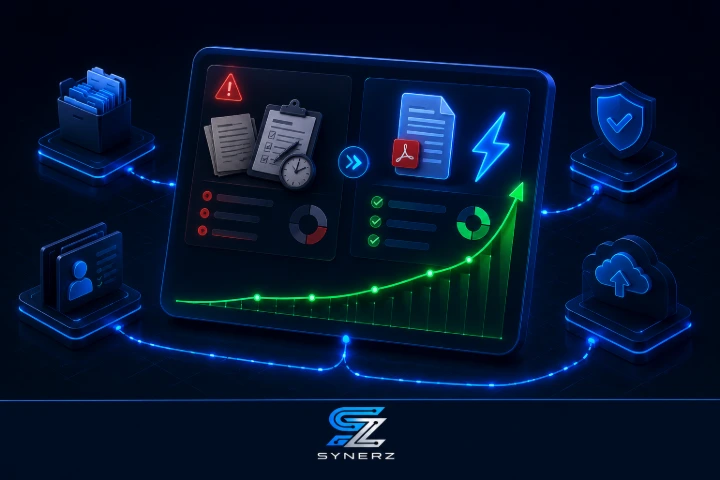
Step-by-Step: How to Get Started Digitizing Your Attendant Care Plans
You do not need to buy a whole system today to start fixing this problem. Here are actionable steps you can take right now, even without SYNERZ.
Audit Your Current Process. For one week, track exactly how many manual steps are involved in your attendant care plan process. Write down every time someone touches the paper or the data. This will show you the true cost of inefficiency.
Get an iPad and a Document Signing App. Start by using a simple app like InPersonForms or Fill & Sign to capture a signature on a PDF. This is a stopgap but will immediately reduce printing and scanning.
Standardize Your Attendant Care Plan Template. Create a master digital template for all your care plans. This ensures consistency across all your PSWs and clients.
Train Your PSWs. Any new process will fail without buy-in from your team. Show them how the digital process makes their job easier—no more carrying stacks of paper, no more worrying about losing forms.
Evaluate a Connected System. Once you have identified the inefficiencies, look at a system like SYNERZ that connects the entire workflow from client signature to billing. Do not look for a point solution; look for a system that eliminates the handoffs.
Common Mistakes to Avoid
Mistake 1: Just Scanning Paper
You do not want an app that only scans. If your "digital" process still relies on printing the form, getting a signature, and then scanning it, you have not fixed the process. You have just added a step. You need a system where the signature is captured directly on the device.
Mistake 2: A Disconnected App
A PDF signing app is helpful, but if it does not talk to your billing or payroll software, you are still manually transferring data. Look for a connected system that handles the signature and auto-generates timesheets and invoices.
Mistake 3: Ignoring the Audit Trail
An electronic signature is only as good as the audit trail behind it. You need to know who signed, when they signed, and what they signed. In a CRA inspection, an unsigned or poorly tracked document could be a major liability.
Mistake 4: No Offline Capability
Many PSWs work in rural areas or in basements with no internet. Your digital attendant care plan must work offline. The system should capture the signature and sync the data as soon as a connection is available.
Mistake 5: Making it Complicated
The digital process should be simpler for the PSW and the client than the paper process. If it requires a login, multiple taps, and navigating a complex app, it will not be used. The interface for capturing a signature should be intuitive. A 3D cinematic rendering on your office computer looks nice, but the field app needs to be simple.
Ready for a Clear Picture of Your Attendant Care Plan Process?
Book a free 20-minute attendant care plan review. We review your current process and give you a clear picture of where your agency stands. No pitch. No obligation. Just clarity.
📧 info@synerz.ca | 📞 +1 647 493 8110 | 🌐 www.synerz.ca
Frequently Asked Questions
What is an attendant care plan?
An attendant care plan is a document that outlines the specific care services a client requires. It includes details on personal care, medication reminders, and other assistance tasks. It is a legal requirement and the basis for billing in Ontario home care.
Why do I need an electronic signature on an attendant care plan?
An electronic signature is legally binding and serves as proof that the client acknowledged the care they received. This is crucial for billing, CRA audits, and HSCPOA compliance. A digital signature captured on an iPad is more secure and verifiable than a paper version.
Is an attendant care plan the same as a service agreement?
No, a service agreement is a contract for ongoing services, while an attendant care plan is the day-to-day care plan. The care plan details the specific tasks a PSW will perform at each visit, and the service agreement sets the terms of the broader business relationship.
What software is best for digital attendant care plans?
The best software is not a standalone PDF signing app. It is a connected ERP like Odoo 19 Enterprise, which we implement at SYNERZ. A connected system captures the signature and then auto-generates timesheets, payroll, and invoices—all in one workflow.
How much does an attendant care plan software cost for a PSW agency?
Costs vary widely. Simple e-signature apps can be $20–$50/month. A connected ERP system that includes this functionality is more of an investment. SYNERZ offers free setup and monthly plans starting at $650/month for a complete operating system.
What happens if a client cannot sign the iPad?
The system should accommodate this. A PSW can sign on the client's behalf with the client's consent, or the system can capture a witness signature. The audit trail must document why the client did not sign directly.
Can a digital attendant care plan be used for billing?
Yes. In our system, the approved timesheet and the linked attendant care plan automatically generate the invoice. This creates a clean, auditable chain from care delivery to billing, eliminating manual data entry errors.
Author: Munawar Abbas — Founder & CEO, SYNERZ