‼️ Your website is a lead magnet. But are you actually catching anything?
Most Ontario PSW and home care agencies treat their website like a digital brochure. They spend money on design, traffic, and SEO, but when a potential client lands on the page, there is no real mechanism to engage them. The visitor browses, maybe reads a few pages, and leaves. You never know they were there. You never get a chance to convert them.
⚠️ The problem is not traffic. The problem is friction.
The average home care inquiry comes with urgency. A family member just fell. A discharge date was set for tomorrow. A caregiver needs to be in place within 24 hours. But when the website visitor has to hunt for a phone number, send an email, or fill out a long form, that urgency becomes frustration.
✅ There is a better way. A connected system that turns every website interaction into a trackable, actionable client pipeline.
At Essential Staff, we have been running this exact system for three years. Website visitors land, they engage with Live Chat, and the conversation is automatically captured in our homecare agency CRM Canada. No manual data entry. No lost inquiries. No follow-up gaps. Just a clean, automated pipeline from visitor to client.
What if you could capture every website inquiry, qualify it instantly, and route it straight to your CRM—without lifting a finger?
Here is how we built it. Here is how you can too.
The Problem: Why Your Website Is Leaking Revenue
The "Contact Us" page is where leads go to die.
Think about it. A family is searching for home care for their aging parent. They land on your website. They need to know if you serve their area, if you have PSWs available, and how fast you can start. They do not want to fill out a long web form. They do not want to wait for an email response. They want answers now.
Here is what actually happens in most agencies:
A visitor initiates a Live Chat. An operator responds. The conversation is helpful. But then the visitor disconnects. The chat is lost forever.
The operator needs to transfer the conversation to a care coordinator. But the operator does not know how to create a lead in the CRM. The visitor is asked to call back. The follow-up is manual and inconsistent.
A chat happens after hours. The visitor leaves their phone number. But the operator who takes it down forgets to log it. The next morning, no one knows who called. The opportunity is gone.
The root cause is simple: disconnected systems.
Your website is separate from your CRM. Live Chat is not integrated with your contact management. The result? The sales process is broken before it even starts.
In the current Ontario context, this is lethal.
The Home Care Worker PR pilot is paused for 2026.
New Low-Wage LMIA rules are tightening effective April 2026.
The PSW shortage is only getting worse, with Ontario needing 51,900 more PSWs by 2027.
Every lead counts. When the supply of workers is constrained, you cannot afford to lose potential clients to broken intake processes. You need a homecare agency CRM Canada that captures every opportunity, automatically.
The Connected System: Live Chat + CRM
The fix is not a better Live Chat tool. The fix is one connected system where the Live Chat and CRM talk to each other.
This is what we have built at Essential Staff using Odoo 19.
Here is how it works:
Website Visitor Lands: A potential client or family member visits your website.
Live Chat Starts: They click the Live Chat widget. A conversation begins. For general inquiries, an AI chatbot can handle the first layer of questions, gathering basic contact information and intent.
Automated Lead Capture: The operator, or the AI, uses the /lead command within the chat. This instantly creates a new lead in the Odoo CRM.
Lead Enrichment: The CRM automatically pulls in the chat transcript, the visitor's name, email, phone number, and even the pages they visited on your site.
Pipeline Assignment: The lead is assigned to the appropriate sales team or care coordinator. The sales process begins, without a single manual entry from the operator.
This is not just a "feature." It is a fundamental shift in how you operate.
The chat is no longer a dead-end conversation. It becomes the starting point of a structured, tracked, and managed sales pipeline. Every interaction is recorded. Every lead is qualified. Every opportunity is visible in your homecare agency CRM Canada.
💡 The Two-Pipeline System: How It Connects
The Live Chat to CRM pipeline is one half of a larger system. It feeds into the Client Pipeline, which flows from website lead to signed agreement to scheduled shifts to invoicing.
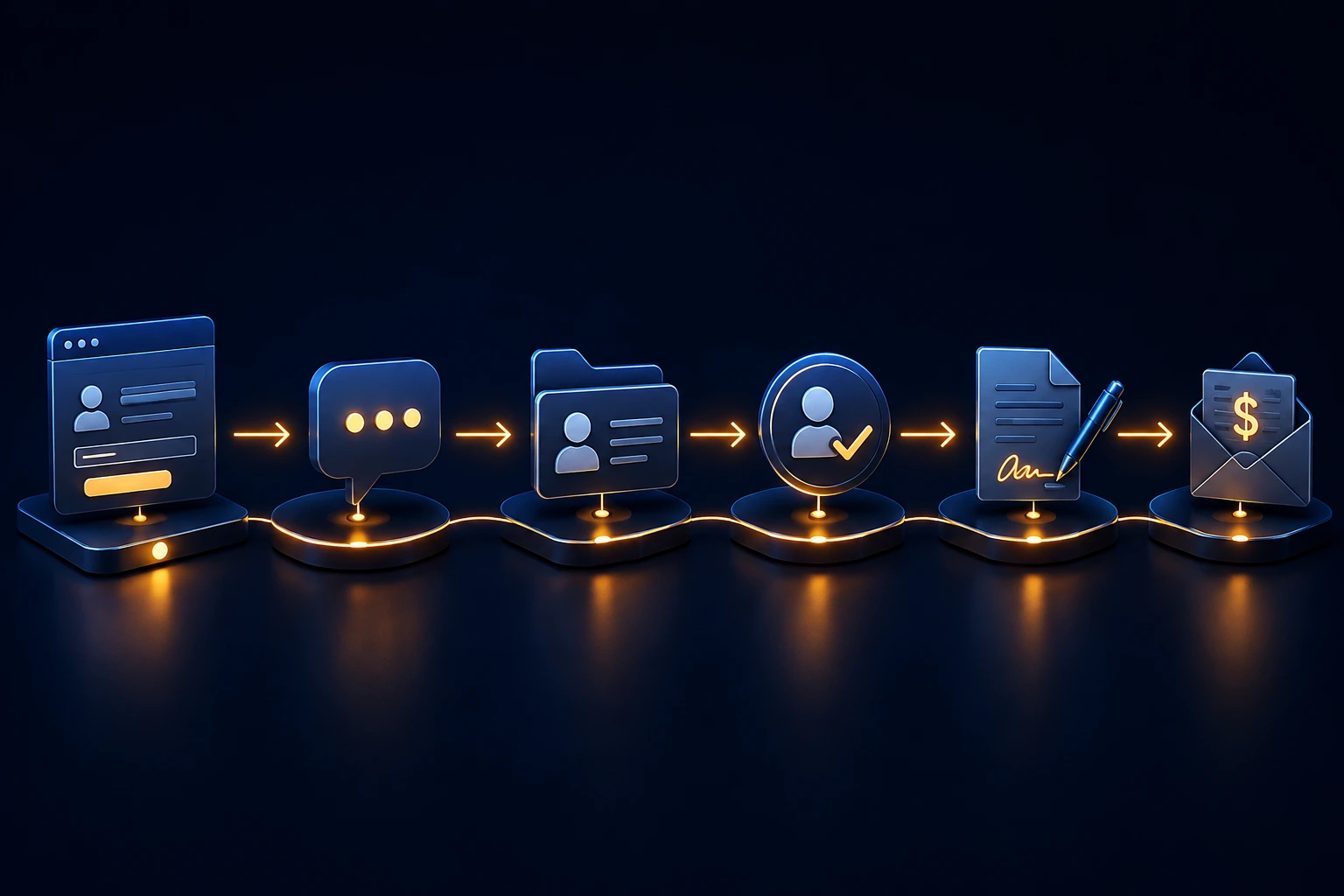
Client Pipeline:
Website Lead Form OR Live Chat → visitor engages
Lead Auto-Created in CRM → captured with chat transcript
Qualify Lead → assess needs, urgency, service area
Convert to Client → assign PSW, schedule assessment
Sign Agreement → digital signature via Odoo Sign
Schedule Shifts → Planning module for PSW assignment
Timesheets → PSW logs hours in mobile app
Accounting/Invoice → auto-generated from timesheets
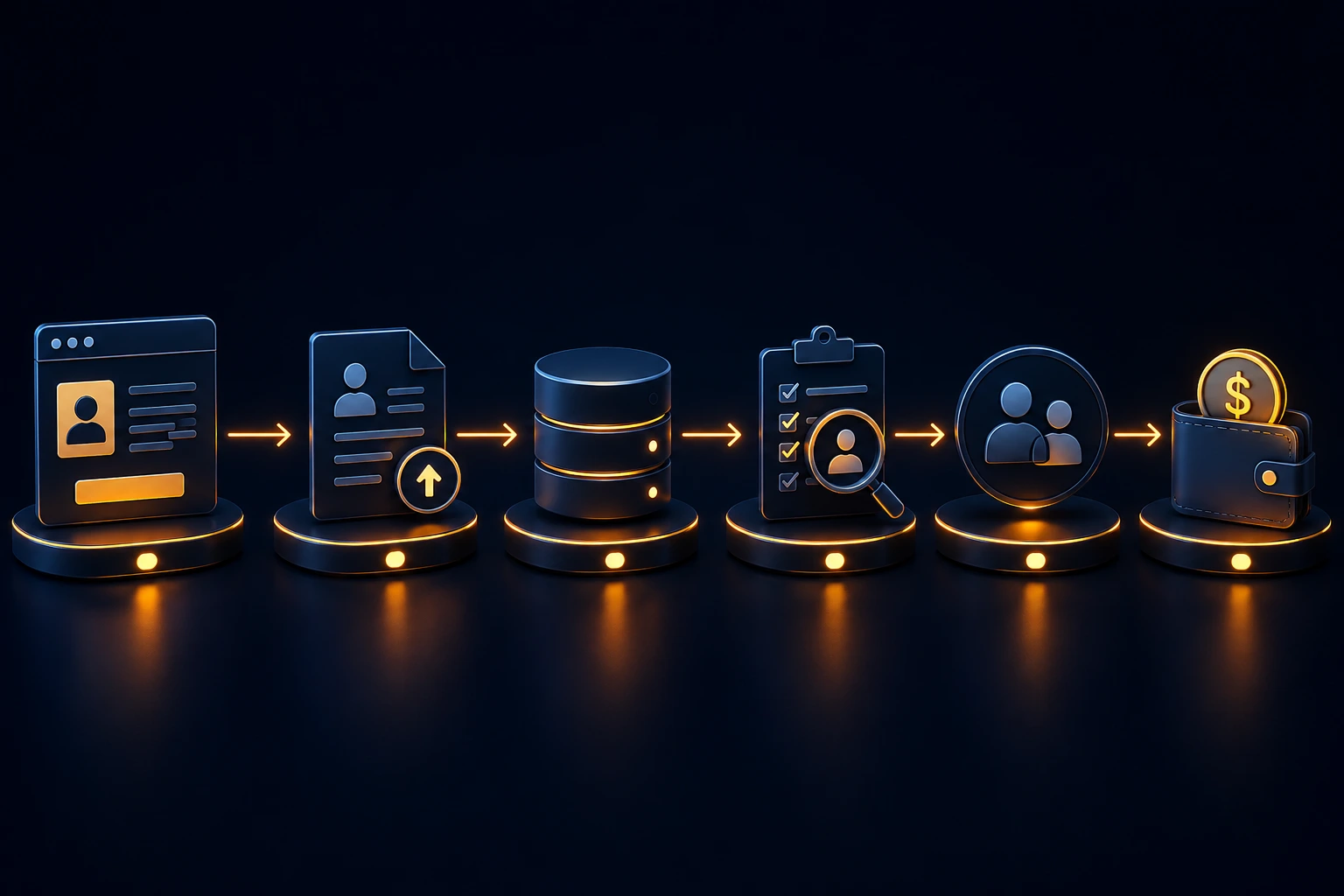
The Staff Pipeline runs in parallel:
Website Job Post → PSW submits resume
Auto-Lands in Recruitment DB → candidate profile created
Screen / Interview → track progress in Recruitment
Hire or Hold in Pool → employee record created
Employees Module → credentials, documents, certifications tracked
Planning/Shifts → match PSW to client openings
Timesheets → PSW logs shift hours
Payroll → auto-calculated from timesheets
Both pipelines converge at the Odoo operating core. The CRM, Recruitment, Sales, Accounting, Planning, and Timesheets modules all share the same database. When a Live Chat lead becomes a client, the system knows which PSWs are available. When a PSW logs a timesheet, payroll and invoicing are triggered simultaneously.
Live Modules at Essential Staff (Proof-First Rule)
Every module we mention is live and operational at Essential Staff.
Planning
Time Off
Accounting
Sales
Recruitment
Website
Discuss
Calendar
Appointments
To-do
Contacts
CRM
Dashboards
AI
Documents
Project
Timesheets
Social Marketing
Marketing Automation
Email Marketing
Surveys
Sign
Employees
Payroll
Attendances
Referrals (partial)
Live Chat
Data Cleaning
WhatsApp
Blocked Modules (No Content): Phone, SMS Marketing, Marketing Card.
Before-and-After Comparison
Metric | Before (Disconnected Systems) | After (Connected Odoo System) |
Lead Capture | Manual entry, lost chats, missed inquiries | Auto-captured from Live Chat and website forms |
CRM Update | Operator manually creates contact record | System auto-creates lead with full context |
Follow-up Time | Hours to days, depends on staff | Immediate assignment to care coordinator |
Lost Leads | 30-50% due to follow-up gaps | Less than 5% fall through cracks |
Payroll Run | 3+ hours of manual calculation | 18 minutes, fully automated |
Shift Fill Time | Hours or days | Under 3 minutes |
The numbers do not lie.
Insider Tip Box
💡 Insider Tip
Stop treating your Live Chat like a helpdesk. Treat it like a sales intake channel.
Most agencies set up Live Chat just to answer questions. That is a waste. The real value is using it as a lead generation engine. Train your operators to use the /lead command in every chat that shows sales intent. Even if the visitor says they are "just looking," create the lead. You can always update the status later. But if you do not create it, you cannot follow up. At Essential Staff, 40% of our new client inquiries now come through Live Chat, and zero of them require manual data entry.
Real Results from Essential Staff
This is not theory. This is how we run our own agency.
600+ PSW database: A fully searchable pool of qualified PSWs.
Shift fill in under 3 minutes: Because the CRM knows which PSWs are available and qualified.
Payroll run dropped from 3+ hours to 18 minutes: Timesheets feed directly into payroll and accounting.
Zero CRA penalties: Automated payroll and compliance tracking ensures we never miss a filing.
Three years of operational proof: This system has been live since 2023. It works.
Every claim here is verifiable from our live agency operations.
Step-by-Step Implementation Guide
You do not need to buy SYNERZ services to start improving your intake process. Here is how to begin:
Step 1: Audit Your Current Intake Process
List every way a lead can enter your agency. Website form, phone call, email, Live Chat, referral, walk-in. Map out what happens from first contact to signed agreement. Identify where leads get lost.
Step 2: Set Up Live Chat on Your Website
You can do this with Odoo, or with any tool. The key is making it easy for visitors to start a conversation. Put the widget on every page.
Step 3: Define Your Lead Qualification Criteria
Write down exactly what information you need to qualify a client inquiry: service area, care needs, urgency, budget, contact details. This is the "minimum viable lead."
Step 4: Establish a Protocol for Manual Lead Creation
Even with an automated system, you need a rule: every conversation with sales intent triggers a lead creation. Train your operators to use it every time. For Odoo users, this is the /lead command.
Step 5: Review Weekly
Track how many leads come from Live Chat. How many convert to clients? What is the conversion rate? This is the feedback loop that helps you improve.
Common Mistakes Section
Mistake 1: Treating Chat as a Support Tool
Most agencies see Live Chat as a customer service channel. They use it to answer questions, but they never think of it as a sales tool. The consequence? 70% of chat conversations end with no follow-up. Instead, treat every chat as a potential lead. Use the chat to qualify, not just inform.
Mistake 2: No System for Capturing Chat Data
Even if you have a homecare agency CRM Canada, if your operator has to manually copy-paste chat transcripts, you will lose the detail. The fix is using a system that auto-creates leads with the full context. Odoo Live Chat does this natively.
Mistake 3: Waiting for "Perfect" Before Starting
Some agencies delay implementing Live Chat because they want a complex chatbot or AI integration first. That is a mistake. Start with a simple, human-operated Live Chat. The CRM integration matters more than the AI. Once the process is solid, automate.
Mistake 4: Not Routing Leads Immediately
Even with a CRM, if you create a lead but do not assign it to someone, it will sit. Set up automatic assignment rules. New leads should be visible on a dashboard. The care coordinator should get a notification. Speed is everything in home care.
Mistake 5: Ignoring the Mobile Experience
Most visitors will engage with your Live Chat from their phone. If the widget is not optimized for mobile, or if the operator response time is slow, you will lose them. Ensure your team can manage chats from mobile devices and that response times are under 60 seconds.
Book a Free 20-Minute Intake & CRM Review
You do not have to lose another lead to a broken intake process.
Book a free 20-minute review and we will walk you through how a connected homecare agency CRM Canada can capture every website visitor, automate your lead follow-up, and shorten your sales cycle. No pitch. No obligation. Just clarity from a fellow Ontario operator who has been running this system for three years.
📧 info@synerz.ca
📞 +1 647 493 8110
Frequently Asked Questions
Q1: What is homecare agency CRM Canada?
A homecare agency CRM Canada is a customer relationship management system designed for the specific needs of Canadian home care and PSW staffing agencies. It helps you track leads, manage client relationships, automate follow-ups, and convert website visitors into paying clients.
Q2: How does Live Chat integrate with a homecare agency CRM?
In Odoo, Live Chat and CRM are natively integrated. When a visitor chats with your team, the operator can click a button or type /lead to instantly create a new lead in the CRM. The chat transcript, visitor name, email, and phone number are automatically saved. No manual data entry required.
Q3: Can a chatbot create leads automatically?
Yes. Odoo allows you to configure a chatbot to collect visitor information and then use a "create_lead" step to automatically create a CRM lead. This handles basic qualification and lead capture even when your team is offline.
Q4: What if the Live Chat conversation is a support request, not a sales lead?
If an existing client uses Live Chat for support, you can configure the system to create a helpdesk ticket instead of a CRM lead. In Odoo, this is handled through the Helpdesk module. The ticket will be linked to the client's record.
Q5: How do I know if my current intake process is broken?
Ask yourself these questions: How many website visitors do you turn into leads each month? What is your conversion rate? How many leads get lost because of follow-up gaps? If you cannot answer these, your process is broken.
Q6: How does a homecare agency CRM help with PSW staffing?
A homecare agency CRM Canada is not just for client relationships. It is part of an interconnected system. When combined with Odoo's Recruitment and Planning modules, the same CRM that captures clients also tracks PSW availability and matches them to open shifts. This creates a single, unified operating system.
Q7: Is this only for large agencies?
No. The beauty of Odoo is that it scales. A small agency with 2-3 staff can run the same connected system as a large agency. The implementation costs are manageable, and the efficiency gains are even more dramatic for smaller teams who are manually doing everything.
Q8: How long does it take to implement Live Chat + CRM?
If you already have Odoo running, the Live Chat module can be activated and configured in a few hours. The chatbot customization may take a few days. If you are starting from scratch, a full implementation of CRM, Live Chat, and core modules typically takes 4-8 weeks, depending on your scope.
Author voice: Munawar Abbas — Founder & CEO, SYNERZ