If you are running an Ontario PSW or home care staffing agency and you still have separate systems for recruitment, client intake, and billing, you are building administrative overhead into your business model from day one. I know because I built that exact disconnected mess at Essential Staff, and I spent three years unwinding it.
Here is the reality: most agencies treat recruitment and client acquisition as separate problems solved by separate tools. Job postings live on Indeed. Applicant tracking lives in a spreadsheet. Client leads land in an inbox. Service agreements get signed on DocuSign. By the time a PSW is hired and a client is onboarded, you have copied the same data across five systems and created four opportunities for something to go wrong.
At Essential Staff, we do not have separate systems. We have one unified Odoo operating system with two pipelines that converge at the core: the staff pipeline and the client pipeline. Everything flows into the same connected Odoo system. Here is how that build actually runs in a live Ontario PSW agency.
The Problem With Disconnected Systems in PSW Staffing
Before I walk you through the two-pipeline system, let me be direct about what happens when you run separate tools for recruitment, CRM, scheduling, and payroll.
Data drift is inevitable. When you enter a PSW's name, contact information, credentials, and availability into an applicant tracking system, and then re-enter that same information into your scheduling software when they are hired, and then re-enter it again into your payroll system, you are creating three separate data sets that will inevitably diverge. An address changes in one system but not the others. A credential expiry date gets updated in the recruitment system but the employee record still shows it as valid. A phone number gets corrected in payroll but the scheduling system still has the old one.
Administrative overhead multiplies. Every disconnected system requires its own data entry, its own user training, its own login, and its own support contract. Your team spends their time copying data from one system to another instead of doing the work that actually generates revenue. Your coordinators are not coordinators anymore. They are data entry clerks.
Compliance becomes a guessing game. When your credential tracking lives in a spreadsheet and your scheduling lives in a separate app and your payroll lives in a third system, you have no single source of truth for whether a PSW was compliant on the day they worked a shift. If the CRA or Ministry of Health asks for an audit trail, you are stitching together reports from three different vendors and hoping they match.
Shift-fill speed collapses. When a PSW cancels at 10 PM and your coordinator has to manually check which workers are available, which credentials are current, and which workers are already scheduled for tomorrow, you are losing hours to administrative friction. The agencies that fill shifts fastest are not the ones with the most staff. They are the ones with the most connected systems.
Client onboarding drags. When a prospective client fills out a contact form on your website, and that form emails someone in your office who manually creates a lead in your CRM, who then manually creates a service agreement in a separate document system, who then manually enters the client into your billing system, you have built a multi-day onboarding process that could take minutes.
Revenue recognition lags. When your scheduling system does not talk to your billing system, you are not invoicing clients on time. When your payroll system does not talk to your accounting system, you are not reconciling labour costs against revenue. You are running your agency with one hand tied behind your back.
This is not how modern staffing agencies operate. This is how agencies that are struggling to scale operate. And the gap between the two is widening every year.
The Two-Pipeline Solution: One System, Two Flows
The solution is not another standalone tool. It is connecting two pipelines that already exist in your agency the staff pipeline and the client pipeline so they work as one system, sharing the same data, the same logic, and the same audit trail.
Staff pipeline: Website job post → PSW submits resume → auto-lands in Recruitment DB → screen → hire or hold in pool → Employees → Planning/Shifts → Timesheets → Payroll
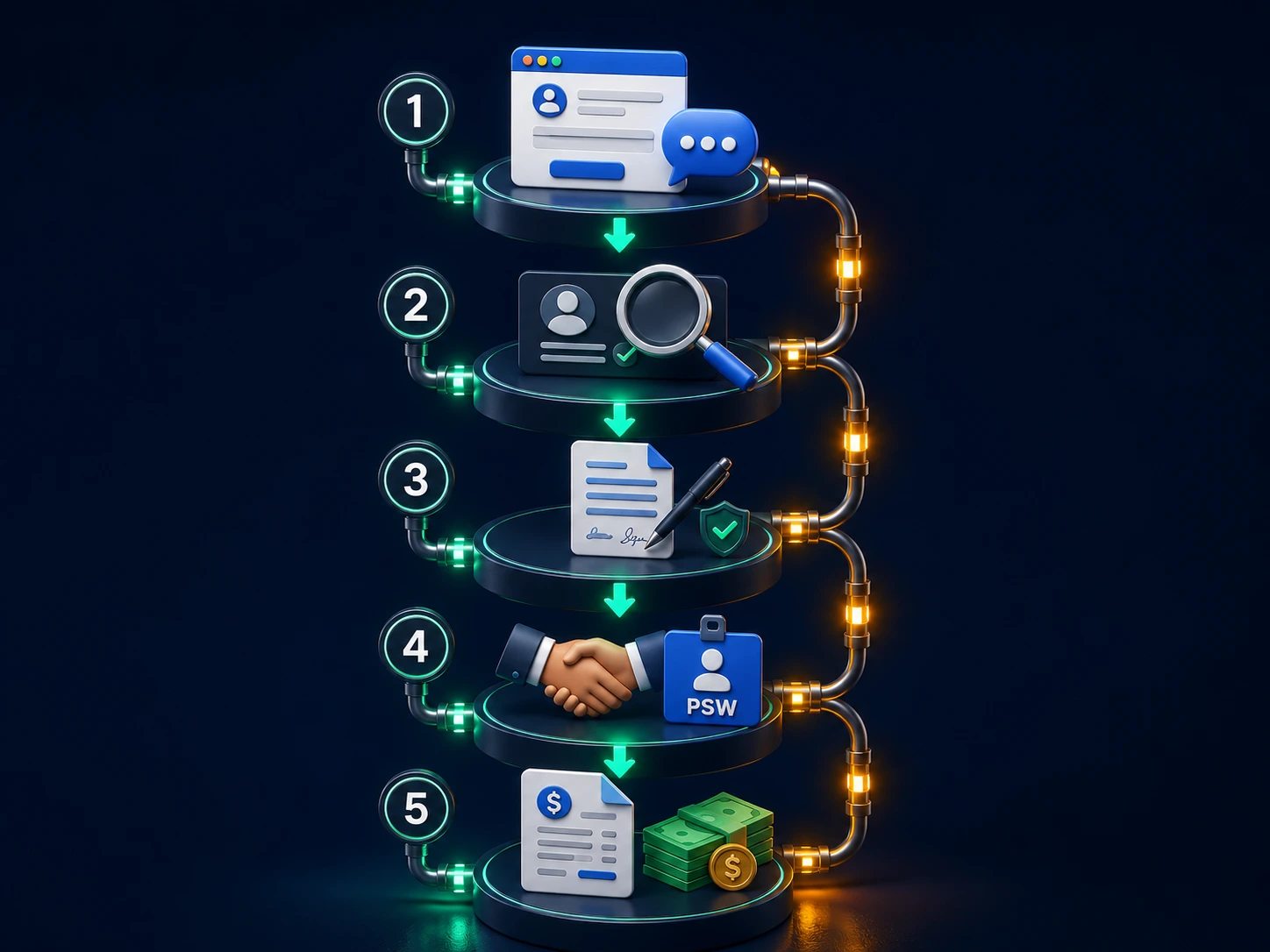
Client pipeline: Website lead form OR Live Chat bot → lead auto-created in CRM → qualify → convert → assign PSW → Sign agreement → Timesheets → Sales/Accounting → invoice
Both pipelines converge at the same Odoo operating core. The staff pipeline brings PSWs into the system. The client pipeline brings clients into the system. And at the center, the scheduling, timesheet, payroll, and billing modules match staff supply with client demand.
This is not theoretical. This is running today at Essential Staff, a licensed PSW agency in St. Thomas, Ontario. And I built it.
The Staff Pipeline: From Website Job Post to Payroll-Ready Employee
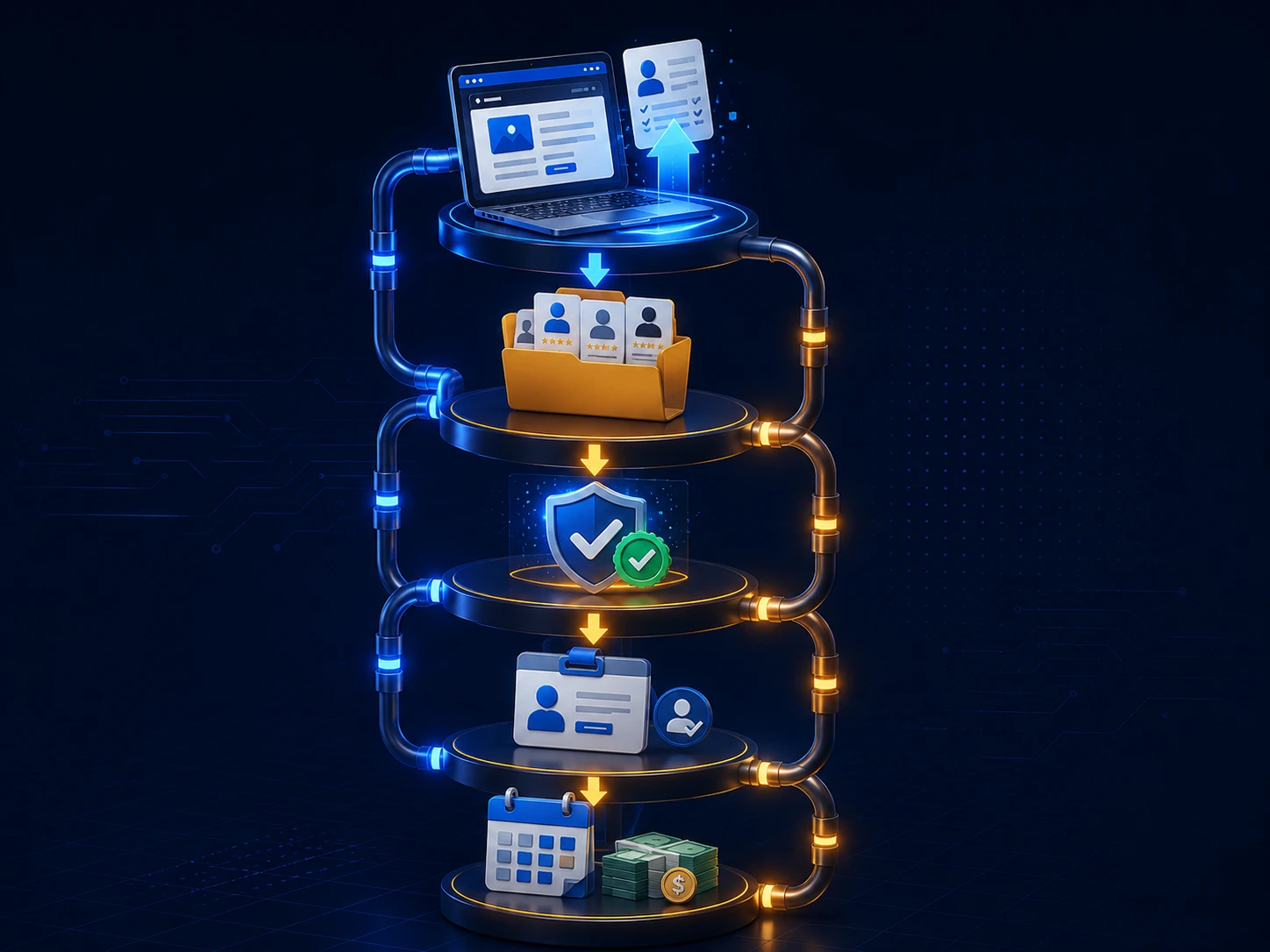
Let me walk you through exactly how the staff pipeline runs at Essential Staff. Every step is live in our Odoo 19 Enterprise system.
Step 1: Website Job Posting
The staff pipeline starts the moment a PSW submits an application through your website. Not through an Indeed link that dumps a PDF into your inbox. Not through a Google Form that you manually export to a spreadsheet. Through your website, connected directly to your Odoo Recruitment module.
Odoo manages job positions and publishes them directly to your site with one click. Job seekers see your open roles, complete skills and availability, and submit their resume. That form creates a candidate record in the Recruitment app automatically. The system indexes experience, skills, location, shift preferences, and availability types.
Here is what happens in the background: the website form submission triggers a candidate creation in Odoo. The resume is parsed. The candidate's email, phone number, address, and any attached documents are stored in the candidate record. The candidate is assigned to the "New" stage in your recruitment pipeline. An automated email is sent to the candidate confirming receipt of the application. Your recruitment team gets a notification that a new candidate has arrived.
No one copied anything from anywhere. The data entered on your website is now in your recruitment system.
Step 2: The Recruitment Pipeline
In Odoo, candidates are tracked through a customized pipeline with stages like "New," "Screening," "First Interview," "Credentials Review," "Hired," and "Reserve Pool." Automated emails are sent at different stages so candidates never wonder where they stand. Activities (calls, meetings, scheduled interviews) are assigned to recruiters and tracked from the candidate card.
Each candidate card is a complete record. It contains the candidate's name, contact details, employment history, education, certifications, availability preferences, shift preferences, and any internal notes from your recruitment team. It also contains a timeline of all interactions emails sent, calls logged, interviews scheduled, and documents received.
The pipeline is visual and customizable. You can drag candidates from one stage to the next. You can configure the system to send automated reminders when a candidate has been in a stage too long. You can assign tasks to different team members. You can see at a glance how many candidates are in each stage and how long they have been there.
The Recruitment module also integrates with Odoo's email marketing tools. If you have a pool of candidates who were not hired but are still qualified, you can send them targeted emails when new positions open up. That pool of 600+ PSWs at Essential Staff? The Recruitment module manages every single one of them.
Step 3: Credential Gating
This is what separates the Odoo approach from generic ATS tools. Odoo's dashboard for candidates shows key credential expiry dates at a glance. A PSW with a lapsed Police Vulnerable Sector Check or an expired CPR & First Aid certification sits in the "Credentials Review" stage and does not move forward until the green flags turn back on.
At Essential Staff, we track five key credentials on every PSW record:
PSW Certificate (or equivalent)
Police Vulnerable Sector Check
CPR & First Aid Certification
TB Test (valid within the last year)
References
Each credential has an expiry date. The system tracks these dates and shows them as colour-coded indicators on the candidate card. Green means current. Yellow means expiring within 30 days. Red means expired.
When a credential turns red, the candidate is automatically moved to the "Credentials Review" stage if they are in an active pipeline. If they are already hired and working, the system sends an alert to the HR team. The credential dashboard shows the entire workforce's compliance status at a glance. No spreadsheets. No manual checking. Just a single source of truth.
This credential gating extends to the shift-fill system. When a shift opens and the system sends an alert to PSWs in the database, it only sends to PSWs whose credentials are green. An expired credential means no notification. The system blocks uncredentialed PSWs from being assigned to shifts automatically.
Step 4: Transition to Employee
When a candidate is hired, a one-click button turns that applicant record into an Employee record in the Odoo system. The same data moves across. No re-entry. No new spreadsheet. The employee inherits all the information already collected: email, phone number, address, SIN, skills, credentials, and availability.
This transition is critical. In most agencies, the recruitment system is separate from the HR system, so when a candidate becomes an employee, someone has to manually re-enter all their information. That re-entry is where errors creep in. A typo in a phone number. A missed credential expiry date. A wrong SIN digit. Those errors compound over time and create compliance headaches that you do not discover until the CRA audit arrives.
With the one-click transition, the data is entered once, at the point of application, and it flows through the entire lifecycle. The PSW who applied through your website six months ago has the same data in your payroll system today as they had in your recruitment system then. The data does not drift because it never gets re-entered.
The employee record also inherits any tags and categories from the candidate record. If the candidate indicated availability for overnight shifts, that tag follows them into the employee record. If they have experience with dementia care, that tag follows them. These tags are used later in the scheduling process to match PSWs to client needs.
Step 5: Into Operations
Once an employee is in the Odoo system, they appear in the Planning and Shifts modules. A coordinator assigns them to shifts, timesheets are logged, hours flow to Payroll, and Odoo Accounting handles the full CRA-compliant pay calculation.
Here is how the shift assignment works. A coordinator opens the Planning module, sees which shifts need coverage, and drags an available PSW onto the shift. The system checks the PSW's credentials automatically. If the credential is expired, the system warns the coordinator. If the PSW is already scheduled for overlapping shifts, the system warns the coordinator. If the PSW has requested time off, the system warns the coordinator.
Once the shift is assigned, the PSW receives a notification through Odoo's Discuss or email. They confirm the shift. The shift appears on their schedule. At the end of the week, the PSW logs their timesheet through the Timesheets module. The timesheet pulls shift data directly from the Planning module, so there is no manual entry. The PSW simply confirms the hours they worked.
Timesheets flow to Payroll. The Payroll module calculates CPP, CPP2, EI, federal tax, and Ontario provincial tax automatically. The calculations are based on the latest CRA rates: CPP on earnings up to $74,600, CPP2 at 4% on earnings between $74,600 and $85,000, EI at 1.63% on earnings up to $68,900, federal tax at 14%, and Ontario provincial tax at 5.05% on the first $53,359. The system also applies the $3/hour PSW wage enhancement automatically.
Payroll generates remittances and T4s. The Accounting module records every transaction. The entire flow from job post to payroll happens in one system. No one re-enters a number. No one reconciles two systems.
The Client Pipeline: From Website Lead to Signed Agreement to Billing
The client pipeline mirrors the staff pipeline but flows in the opposite direction. It starts when a prospective client a hospital, LTC home, or family seeking PSW care lands on your website and fills a contact form or triggers the Live Chat bot.
Step 1: Lead Capture
Odoo's Website module handles smart contact forms. When a lead is submitted, an Opportunity is automatically created in the CRM with all relevant details: the client's name, organization type, care needs, shift requirements, and budget range. The CRM dashboard shows every lead, its stage, and upcoming activities.
Here is how the lead capture works in practice. A hospital discharge planner visits your website, fills out the contact form with details about a patient needing PSW support, and submits. The form data is immediately available in Odoo CRM. No one has to type it into a spreadsheet. No one has to forward an email. The lead is already in your CRM.
The Live Chat bot adds another layer of lead capture. A prospective client visits your website, starts a chat conversation, and asks about your services. The chat is recorded in Odoo. If the visitor provides their contact information, a lead is automatically created in the CRM. The chat transcript is attached to the lead, so your sales team can see exactly what was discussed before they even make the first call.
Every lead has a stage. The default CRM pipeline in Odoo includes stages like "New," "Qualified," "Proposition," "Negotiation," "Won," and "Lost." You can customize these stages to match your agency's sales process. You can also configure automated emails to be sent at each stage. When a lead moves to "Proposition," the system can automatically send a service agreement. When a lead moves to "Won," the system can automatically create a client record.
Step 2: Lead Qualification
The sales team works the lead through the CRM pipeline. Qualification stages track whether the opportunity is a good fit. Phone calls and meetings are logged against the Opportunity. Activities are assigned and deadlines set.
Each Opportunity card contains the client's name, contact person, phone number, email, address, industry, and any other custom fields you have configured. It also contains a timeline of all activities: calls made, emails sent, notes added, documents uploaded, and meetings scheduled. The entire client history is in one place.
The CRM module also includes forecasting tools. You can see projected revenue from opportunities in each stage. You can track win rates. You can see which marketing channels are generating the best leads. You can assign opportunities to specific salespeople and track their performance.
At Essential Staff, we use the CRM to manage every prospective client relationship. Whether it is a hospital needing twenty PSWs for a new unit or a family needing a single PSW for a parent at home, every prospect goes through the same pipeline. The system ensures no leads fall through the cracks and no follow-up tasks are missed.
Step 3: Service Agreement With E-Signature
When a lead is qualified and ready for contract, the Opportunity moves to the "Proposition" stage. Odoo Sign generates a Service Agreement based on the client's specific requirements and sends it for signature. The client signs online. The Opportunity moves to "Agreement Signed."
Odoo Sign is fully integrated with the CRM and Sales modules. You configure your Service Agreement template once it includes your agency's terms and conditions, rates, billing terms, and any other standard clauses. When a client is ready to sign, you generate the agreement from the Opportunity. The system pulls the client's name, address, and any custom terms into the agreement automatically.
The agreement is sent to the client via email. The client opens the document in their browser, reviews it, and signs it with a few clicks. The signed document is stored in Odoo automatically, attached to the Opportunity. A PDF copy is available for download at any time.
This e-signature integration eliminates the manual work of printing, scanning, and emailing documents. It also accelerates the onboarding process. A client who would have waited days to print, sign, scan, and return a document can sign in minutes. And the signed document is already in your system, attached to the client record, ready for billing.
Step 4: PSW Assignment
Now the two pipelines converge. The signed client Opportunity links to the Recruitment/Employee database to identify the best-fit PSW for the assignment. The team opens a discussion within the Opportunity, reviews available PSWs from the employee pool, and assigns the appropriate caregiver.
This is where the system's connected architecture delivers real value. The PSW who applied through your website, went through the recruitment pipeline, passed credential gating, and became an employee is now being matched with a client who needs care. The same system that handled the PSW's application is handling the client's assignment.
The assignment process uses the tags and categories from both the employee record and the client record. If the client needs a PSW with experience in dementia care, the system can filter the employee pool to show only PSWs with that tag. If the client needs overnight shifts, the system shows PSWs with overnight availability. If the client has specific language requirements, the system filters accordingly.
The assignment is tracked in the Opportunity. When a PSW is assigned, the system records the date, the PSW's name, and any relevant details. The assignment creates a link between the client and the PSW that flows through to scheduling, timesheets, and billing.
Step 5: Operations and Invoicing
Once the assignment is active, shifts are scheduled, timesheets are logged, and hours are tracked. The Sales module generates a quotation based on the signed Service Agreement, and a Sales Order is created. At the end of the billing cycle, an Invoice is sent to the client. Payments are tracked against the invoice. The Opportunity moves to "Done" on payment.
The Sales Order in Odoo contains the client's billing details, the rate for the assignment, any applicable discounts or adjustments, and the billing cycle (weekly, biweekly, or monthly). The Sales Order is linked to the Timesheets. At the end of the billing cycle, the system generates an Invoice based on the timesheets and the Sales Order rates.
The Invoice is sent to the client through the Odoo system. The client receives a professional, branded invoice with clear line items for every shift. The invoice includes the total amount due, payment terms, and payment instructions. The client can pay online or by cheque.
When the client pays, the payment is recorded against the invoice in Odoo Accounting. The Accounts Receivable ledger is updated automatically. The Opportunity moves to "Done." The revenue is recognized in the financial statements.
The entire flow from lead to invoice happens in one system. No one has to create an invoice from scratch. No one has to reconcile payments against timesheets. The system handles the billing automatically based on the work that was actually performed.
Why the Two-Pipeline System Matters: The Odoo Integration Advantage
The difference between this approach and using separate "best-of-breed" tools is the difference between a connected operating system and a collection of disconnected point solutions. Let me be specific about what that means in practice.
One system, no re-keying. When a PSW applies through the website, that data lives in Recruitment. When that candidate becomes an employee, the same data moves to Employees. When that employee is scheduled for a shift, the same data flows to Planning and Payroll. When a client signs a service agreement, the terms inform the Sales Order and the Invoice. The data is entered once. It moves where it needs to move automatically. No one ever re-enters a phone number, address, SIN, or credential expiry date.
The Two-Pipeline System convergence. At the core, the staff pipeline and client pipeline converge on the same operating base. The shift schedule knows which PSWs are available and which clients need coverage. Timesheets know which PSW worked which client shift. Payroll knows who worked and for how long. Accounting knows which clients owe which amounts. You are not reconciling a staffing app against a payroll portal against a billing system. It is all one system.
Compliance is automatic, not manual. The system tracks credential expirations across the entire workforce. It alerts when credentials are about to expire. It blocks expired-credential PSWs from receiving shift notifications. It ensures that every PSW working a shift is compliant. And it maintains an audit trail of every credential check, every shift assignment, and every payroll calculation. If the CRA or Ministry of Health asks for proof of compliance, you have it in one system, with one export.
Shift-fill speed increases dramatically. At Essential Staff, our 600+ PSW database receives urgent shift alerts within three minutes. The system sends a professional, branded email to every PSW whose credentials are current. The first qualified responder gets the shift. The coordinator's job is done. No phone calls. No text messages. No manual credential checks. The shift is filled, the timesheet is logged, and the payroll is calculated all through the same system.
Client onboarding accelerates. A client lead that arrives through your website can be in contract, assigned a PSW, and scheduled for a shift within hours not days. The lead is automatically in your CRM. The service agreement is generated from a template and signed online. The PSW assignment uses the same tags and filters that managed the client's needs. The Sales Order is created automatically. The first invoice is sent on schedule. The entire process is streamlined because the data flows through connected systems.
Revenue recognition is accurate and timely. When timesheets are approved, the Sales Order generates the invoice automatically. Payments are recorded against the invoice. Accounts Receivable is updated in real time. You know which clients owe you money, which invoices are overdue, and which revenue has been recognized. Your financial statements reflect the actual work performed, not a manual reconciliation from three different systems.
Proof From a Live Ontario Agency
I did not read about this in a product demo. I built it inside Essential Staff, a licensed PSW agency in St. Thomas, Ontario, and I have been running it for three years.
Our recruitment database has grown past 600 PSWs every one of them credentialed, classified, and reachable by email in under three minutes. That database started at 187 and has grown organically because the system itself becomes a recruitment magnet. PSWs who hear about shifts quickly tell other PSWs who want the same access.
We run biweekly payroll across 26 pay periods a year, and every shift flows cleanly into that payroll. Our payroll run dropped from 3+ hours to 18 minutes when we consolidated everything into Odoo. The shift-fill system is a direct reason why. No re-keying shift data. No reconciling a separate scheduling app against a separate payroll portal.
In three years, we have had zero CRA penalties. That is not a coincidence. When shift-fill, timesheets, and payroll share the same data backbone, the numbers cannot drift apart the way they do when you are copying hours from a text message into a spreadsheet.
Our credential alerts fire at 30, 14, and 7 days before expiry, and expired-credential PSWs are automatically moved out of the active pool. That means the email blast system is self-cleaning. It never reaches a PSW who should not be working. The compliance dashboard shows it all at a glance: green for valid, yellow for warning, red for expired.
The Two-Pipeline System runs the entire agency. PSWs come in through the website job post. Clients come in through the website lead form or Live Chat. The system matches supply with demand. The system schedules shifts, tracks timesheets, processes payroll, invoices clients, and records revenue. All from one connected operating system.
This is the operational proof competitors cannot replicate. This is what a modern Ontario PSW agency looks like when it is built on connected systems rather than disconnected point solutions.
Step-by-Step: How to Build Your Own Two-Pipeline System
You do not need to buy anything from us to start. Here is the order I would follow.
Connect your website to Odoo Recruitment. Make sure every job post on your website creates a candidate record in Odoo automatically. The candidate enters your recruitment pipeline the moment they submit their application.
Configure your recruitment pipeline. Set up stages that match your hiring process. Include a credential review stage. Track every credential with expiry dates. Use colour-coded indicators to show compliance status at a glance.
Set up the one-click employee transition. Configure Odoo to turn a hired candidate into an employee record with one click. The same data should flow from Recruitment to Employees without re-entry.
Connect your website to Odoo CRM. Ensure every lead form submission and Live Chat interaction creates an Opportunity in the CRM. The lead enters your sales pipeline automatically.
Configure your CRM pipeline. Set up stages that match your sales process. Include a service agreement stage. Use Odoo Sign to generate and send documents online.
Configure the employee-to-client assignment. Use tags and categories to match PSW skills and availability with client needs. The assignment process should be visible in both the employee record and the client Opportunity.
Connect scheduling to payroll. Ensure that shifts assigned in Planning flow directly to Timesheets and from Timesheets to Payroll. No manual re-entry. No separate systems.
Connect scheduling to billing. Ensure that shifts worked flow directly from Timesheets to Sales Orders and from Sales Orders to Invoices. The billing cycle should be automatic based on the work performed.
Set up automated credential alerts. Configure the system to send alerts when credentials are about to expire. Use the credential status to gate notifications and shift assignments.
Segment your PSW database. Create segments for availability preferences overnight shifts, day shifts, weekends so your shift alerts reach the right PSWs at the right time.
Common Mistakes Agencies Make With Two-Pipeline Builds
I see the same avoidable errors across agencies when they attempt to connect recruitment and client operations. Do not repeat them.
Mistake 1: Using separate ATS and CRM tools. When your applicant tracking system does not talk to your CRM and neither talks to your payroll, you are building data silos that will eventually crack your compliance. The label on the tool does not protect you. The integration does.
Mistake 2: Letting candidate data drift from employee data. When a candidate's credential expires and that information is not reflected in the employee record, you risk assigning someone who should not be working. Do not let source data drift between systems.
Mistake 3: Deciding classification at tax time. By then you cannot cleanly undo a year of mis-paid runs. Classify before the first shift. The Odoo system handles payroll classification from the outset, not as a year-end scramble.
Mistake 4: Treating the website as a brochure. Your website is not a static page. It is the entry point for both pipelines. If your website is not connected to your recruitment and CRM, you are handing data entry work to your team that should be automated.
Mistake 5: Skipping the e-signature integration. When you print, sign, scan, and email service agreements manually, you add days to client onboarding and create opportunities for documents to be lost. Odoo Sign keeps everything digital, fast, and auditable.
Mistake 6: Ignoring credential gating in shift assignments. If you are not using credential status to filter who gets shift notifications, you are sending alerts to PSWs who cannot legally work. That is a liability and a waste of time.
Mistake 7: Overlooking the billing connection. If your scheduling system does not connect to your billing system, you are invoicing clients based on manually compiled timesheets. That is slow and error prone. The billing should be automatic.
Book a Free 20-Minute Two-Pipeline Review
You do not have to keep running disconnected recruitment and client intake systems. Book a free 20-minute review and we will walk through your current staff pipeline and client pipeline, your website setup, your CRM, and your recruitment workflow then show you how the Odoo Two-Pipeline System would run end-to-end for your agency. No pitch. No obligation. Just clarity from a fellow Ontario operator who built it in a live agency.
📧 info@synerz.ca
📞 +1 647 493 8110
🌐 www.synerz.ca
Frequently Asked Questions
What is healthcare staffing ERP Canada?
Healthcare staffing ERP Canada refers to an enterprise resource planning system built specifically for Canadian healthcare staffing agencies, combining recruitment, CRM, scheduling, payroll, billing, credential tracking, and compliance in one connected platform. For Ontario PSW agencies, this means one system that handles the full lifecycle from applicant to employee to client billing, with CRA-compliant payroll and credential gating built in.
How does Odoo recruitment work?
Odoo Recruitment manages job positions, publishes roles to your website, collects applications, tracks candidates through a customizable pipeline (New → Screening → Interview → Hired), automates emails and activities, and turns a hired applicant into an employee record with one click. The recruitment app connects to the rest of the Odoo system so a PSW who applies through the website can be scheduled, paid, and tracked without re-entering data anywhere.
Can Odoo handle Canadian PSW payroll?
Yes. Odoo Payroll handles CPP ($74,600 YMPE), CPP2 (4% on $74,600–$85,000), EI (1.63% up to $68,900), federal tax at 14%, Ontario provincial tax at 5.05% on the first $53,359, and the $3/hour PSW wage enhancement. Timesheets flow directly to payroll without re-keying, and the system generates CRA-compliant T4s.
What modules does the Two-Pipeline System use?
The staff pipeline relies on Website, Recruitment, Employees, Planning, Timesheets, and Payroll. The client pipeline uses Website, Live Chat, CRM, Sign, Sales, and Accounting. The entire system is connected through Odoo's integrated architecture.
How do I get started with the Two-Pipeline System for my agency?
Start by ensuring your website is connected to Odoo Recruitment and CRM. Then configure your recruitment pipeline with credential-checking stages and set up your client intake workflow with e-signature service agreements. SYNERZ implements this end-to-end for Canadian PSW and home care agencies on Odoo 19 Enterprise. See how it works at synerz.ca.
Does the Two-Pipeline System work for small agencies?
Yes. The system scales from a single PSW to hundreds. The One Pipeline System is the same architecture whether you have 10 employees or 600. The modules are configured to your agency's size and complexity.
How long does implementation take?
With SYNERZ, implementation of the Two-Pipeline System takes weeks, not months. We handle the configuration, integration, and training so your team is operational quickly. The system is proven with a live Ontario agency.
Is the Two-Pipeline System CRA compliant?
Yes. The system is built for CRA compliance from the ground up. Payroll calculations use the latest CRA rates. Timesheets and payroll are in the same system, so there is no data drift. Credential tracking ensures only compliant PSWs are assigned to shifts. The audit trail is complete and exportable.
Author voice: Munawar Abbas - Founder & CEO, SYNERZ